
Client
DIRIO client at work
Desktop shortcuts, the "My folders" and "My resources" tabs, and the tray menu. Notifications cover access grants and data moves.
IT manages file servers from one console. A folder owner grants access — down to a single file. Employees see only their own files on the desktop. Who created, changed or deleted a file is in the journal.
Overview
DIRIO is a file resource management system: a console for the administrator, an agent on the file server, and a client on the desktop. The administrator sees servers and shares from one place. The folder owner decides who sees what. Employees get access on the desktop and see only their own files.
All featuresServers, shares, sessions and open files in one place, refreshed every 10 seconds. Samba settings are defined in the console and applied by the agent.
The administrator assigns an owner and deputies. From then on the owner grants and revokes access from the "My resources" tab — no IT ticket. When someone leaves, ownership is handed over in a couple of clicks.
Access can be granted to any folder or a single file inside a share. Other people's folders and files do not appear in the file manager: users see exactly what they are allowed to see.
A job can start immediately or at a set time. Fifteen minutes before the start the folder becomes read-only: reading continues, writing is closed for the duration of the copy. Clients are notified; data goes directly from source to target.
Create, change, delete, rename — without the noise of someone just opening a folder. Owners see their resources in the client ("Action audit"); administrators see all shares in the console. Administrator actions go into a separate journal.
Mounted folders get desktop shortcuts. The tray menu has "My folders", "My resources" and "Notifications". Access grants and scheduled moves pop up in the client and are also sent by email when SMTP is configured.
Features
Servers, shares, sessions and open files in one console. The list refreshes every 10 seconds.
Every share has an owner and deputies. Access is granted without an IT ticket; ownership is handed over in two clicks.
Access to any folder or a single file inside a share. Other people's files do not appear in the file manager.
Access is on immediately. The user can accept or decline; a decline removes access. The owner sees the status.
The "Notifications" tab in the client, an unread badge, pop-ups, and email when SMTP is configured.
On a schedule or right away. Fifteen minutes before the start the folder becomes read-only. Sources: Linux over SSH, SMB, Windows via WinRM.
Who created, changed, renamed or deleted a file. No noise from simply opening a folder.
Desktop shortcuts, a tray menu, "My folders" and "My resources". If the link drops, folders remount themselves.
How it works
The console manages agents on file servers and Samba with the DIRIO module. The workstation client mounts shares with a domain ticket and talks to the console over HTTPS. An existing Samba server connects through the agent — no container, no reinstall.
Web console and HTTPS API: servers, shares, sessions, migrations, roles and journals. Deployed in Docker from deb/rpm.
A service on the file server: first it only observes, then it applies settings from the console. It also runs data moves.
Samba with the DIRIO module: users see only the folders and files they are allowed. If authorization is down, there is no access.
Tray, CLI and a menu in Nautilus and Dolphin. Tabs: "My folders", "My resources", "Notifications". Sign-in uses a domain ticket.
LDAP sources: single sign-on for administrators, roles bound to directory nodes (OUs/groups) and dynamic collections.
Share access via a domain ticket — no password stored on the client.
Export of access events and administrator actions: Syslog RFC 5424 (UDP/TCP/TLS) and HTTP webhook — KUMA, MaxPatrol, Splunk.
dirio-fm-gnome and dirio-fm-kde packages: a "DIRIO permissions" context menu in GNOME and KDE.
Security
event export: Syslog RFC 5424 (UDP/TCP/TLS) and HTTP webhook — KUMA, MaxPatrol, Splunk.
console rights are bound to the directory: AD, FreeIPA, ALD Pro — groups and OUs.
user file operations and administrator actions live in separate journals.
Other people's folders do not appear in the file manager. If authorization is down, there is no access. Move-source passwords never appear in job logs.
Console rights are bound to AD, FreeIPA or ALD Pro groups and OUs.
Other people's folders and files do not appear in the file manager — the share structure is never revealed.
If authorization is unreachable, DIRIO does not open shares.
User file operations and administrator actions are written separately.
Syslog RFC 5424 (UDP/TCP/TLS) and HTTP webhook: KUMA, MaxPatrol, Splunk.
Screenshots
Desktop shortcuts, the "My folders" and "My resources" tabs, and the tray menu. Notifications cover access grants and data moves.
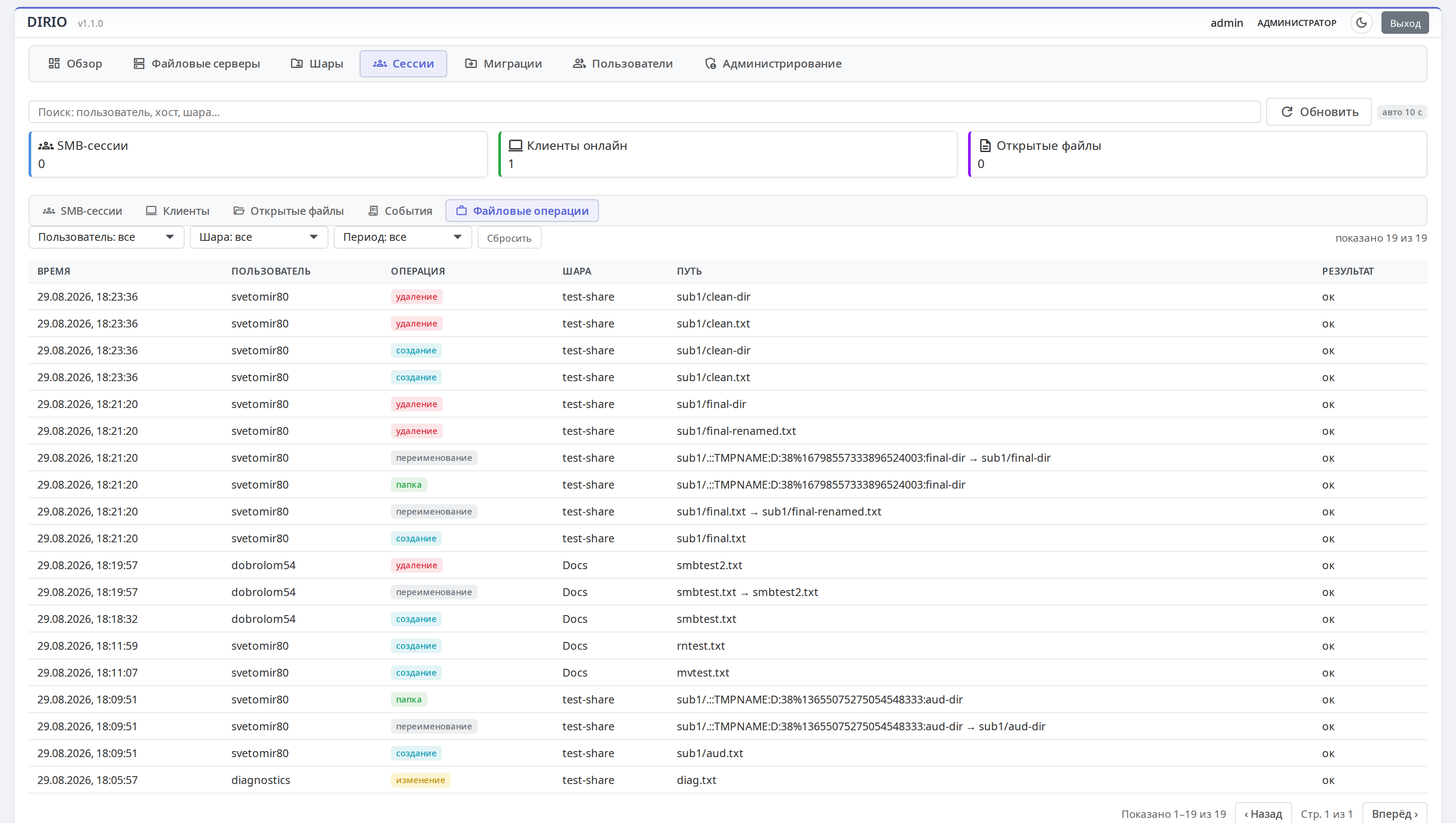
Who created, renamed or deleted what and when — per share.
Who is connected now, from which workstation and to which share. The list refreshes every 10 seconds.
Status and mode of every server, agent version — Linux hosts and the DIRIO Samba container in one table.
Shares with type, server and path. Row actions: owners, permissions, data move.
Scheduled runs, a dry run and a rate limit. Sources: SSH, SMB, WinRM.
A permission matrix: from console access to share and data-move management. Roles bind to the directory.
Sign-ins, access-rule changes, owner assignments and move jobs — every administrator action is on the record.
Servers, agents online, shares — plus console load: CPU, memory, disk.
DIRIO is a file resource management system: a console, agents on file servers, Samba with the DIRIO module, and a desktop client. The administrator manages servers from one place. The folder owner grants access. Employees see only their own files. Every operation is logged.
The administrator assigns an owner and deputies — they get a notification. From the "My resources" tab the owner sees who was granted what and who accepted, declined or has not answered yet. They edit rules, grant access to a folder or a file, and can hand ownership to another employee while staying a deputy. Changes go into the console audit journal.
Access is on immediately. The user gets a notification in the "Notifications" tab and by email: "Accept" or "Decline". A decline removes access to the whole resource and stays in place even if the rules are later edited; re-granting asks for confirmation again. The owner sees the status.
Yes. The DIRIO VFS module builds a virtual tree from the grant policy: rules can point to any path inside a share. Invisible names are hidden from directory listings (readdir), and direct access to a forbidden path returns "no such file" (ENOENT) — the user never learns that someone else's data exists.
A job starts immediately or on a schedule. Fifteen minutes before the start the folder becomes read-only: reading continues, writing is closed. Clients are notified, the icon shows a lock. After completion, writing is opened again. The target server's agent copies the data: Linux over SSH (rsync), SMB network folders, Windows via WinRM. A dry run, ACL transfer and a rate limit are available.
Today — Linux: deb (Astra Linux, Debian, Ubuntu) and rpm (RED OS, RHEL); the console deploys to Docker. The client is a CLI, a tray GUI and a menu in Nautilus and Dolphin; Astra's fly file browser is supported. Directories: MS AD, FreeIPA, ALD Pro; the client signs in with a domain ticket (Kerberos). The Windows client is in development.
Yes. The agent installs on an existing server without a container. The first run is always observe mode: DIRIO only shows what it intends to manage. Co-manage and full modes are then enabled step by step. Before applying settings the agent backs up smb.conf and checks it.
Next steps
We will show the console, folder owners, data moves and the journal — or connect your servers in observe mode, with no production changes.
An online tour of the console and clients on our demo stand, with answers to your architecture and security questions.
Write to info@dirio.ruWe will connect your file servers in observe mode and show the real picture: shares, sessions, Drift.
Discuss a pilotOr directly: info@dirio.ru · +7 995 437-14-87